How to convert date to weekday, month, year name or number in Excel?
Suppose you enter a date in a cell, and it displays as 12/13/2015. Is there a way to show just the month or the weekday, or perhaps the text of the month name or weekday name, such as "December", or "Sunday"? The methods outlined below can help you easily convert or format any kind of date to display only the weekday name or month name in Excel.
- Convert dates to weekday/month/year name or number with Format Cell
- Convert dates to weekday/month name with TEXT function
- Convert a date to weekday/month name with CHOOSE function
- Convert dates to weekday/month/year name or number with an amazing tool
Convert dates to weekday/month/year name or number with Format Cell
We can customize the date formatting and display dates as weekday names or month names only in Excel.
1. Select the date cells that you want to convert to day of the week, month, or year names/numbers, right click and select the Format Cells from the right-clicking menu.
2. In the opening Format Cells dialog box, under the Number tab, click Custom in the Category box, and then enter "ddd" into the Type box.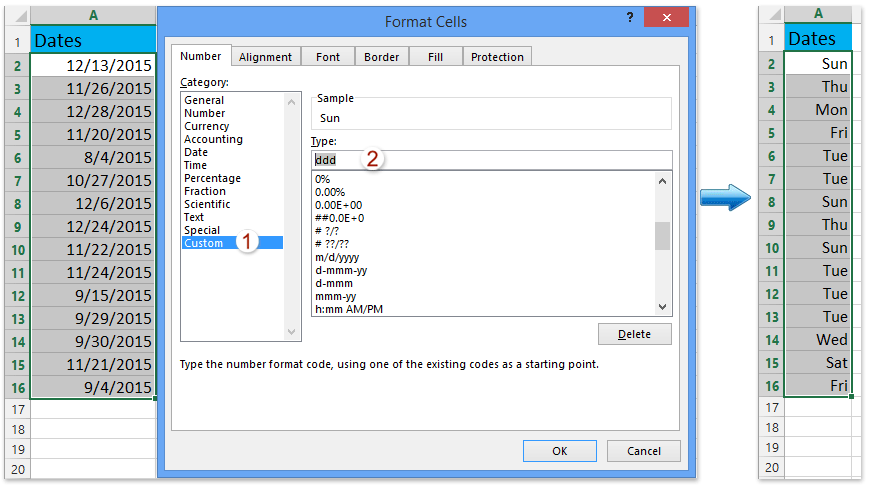
Note: The "ddd" will display dates as a short weekday name, such as "Sat". Take the date 3/7/2019 for example, the following table illustrates various custom date formatting options:
| A | B | C | |
| 1 | Display "3/7/2019" as | Format Code | Formatted Result |
| 2 | Weekday (Name) | ddd | Thu |
| 3 | dddd | Thursday | |
| 4 | Month (Name) | mmm | Mar |
| 5 | mmmm | March | |
| 6 | Month (Number) | m | 3 |
| 7 | mm | 03 | |
| 8 | Year (Number) | yy | 19 |
| 9 | yyyy | 2019 | |
| 10 | Day of the Month (Number) | d | 7 |
| 11 | dd | 07 |
3. Click the OK button to apply the custom date formatting.
One click to convert multiple dates to week/month/year names or numbers in Excel
Are you still manually converting dates to their corresponding day of the week by right-clicking and specifying a formatting code in the Format Cells dialog? With Kutools for Excel's Apply Date Formatting feature, you can effortlessly display a series of dates as month names or days of the week with just one click in Excel!
Kutools for Excel - Supercharge Excel with over 300 essential tools, making your work faster and easier, and take advantage of AI features for smarter data processing and productivity. Get It Now
Convert dates to weekday/month name or number with TEXT function
Microsoft Excel's TEXT function can help you convert a date to its corresponding month name or weekday name easily using a specified formatting code.
Please enter the formula =TEXT(A2,"mmmm") in a blank cell (cell C2 in our case), and press the Enter key. Then drag this cell's fill handle to apply the formula to the range as you need.
The dates are converted to their corresponding month names immediately. See screenshot:

Convert a date to weekday/month name with CHOOSE function
If you find it challenging to remember and use these specific formatting codes in formulas, Excel also allows you to utilize the CHOOSE function for converting dates to month names or weekday names. Here’s how you can do it:
In a blank cell, please enter the formula =CHOOSE(WEEKDAY(B1),"Sun","Mon","Tue","Wed","Thu","Fri","Sat"), and press the Enter key. This formula will convert the date in cell B2 into the day of the week as below screenshot shown.

Convert dates to weekday/month/year name or number with Kutools for Excel
While the TEXT function in Excel efficiently converts dates to a format you want, it's less convenient when dates are scattered across the sheet. In such cases, Kutools for Excel's Apply Date Formatting tool offers a superior solution, enabling you to handle multiple selections with just a few clicks and easily convert all dates in the selections to their corresponding month or weekday names.
1. Select one or multiple ranges containing dates you will work with, and click Kutools > Format > Apply Date Formatting.
2. In the Apply Date formatting dialog box, please select the date formatting in the Date formatting box, and click the Ok button.
- By selecting 03, Mar or March in the Date formatting box, you can convert the dates to month names or month numbers.
- By selecting Wed or Wednesday, you can convert the dates to weekday names.
- By selecting 01 or 2001, you can convert dates to the year numbers.
- By selecting 14, you can convert dates to day numbers.


Now, all the selected dates have been transformed into your specified date format, be it month names, days of the week, or any other format you choose.
Notes:
- The Apply Date Formatting tool modifies the display format without altering the actual values, and you can easily revert the changes by pressing Ctrl + Z to undo.
- Want to access the Apply Date Formatting feature? Download Kutools for Excel now! Beyond this, Kutools boasts a myriad of 300+ other features and offers a 30-day free trial. Don't wait, give it a try today!
Related articles
Insert current day or month or year into cell in Excel
Best Office Productivity Tools
Supercharge Your Excel Skills with Kutools for Excel, and Experience Efficiency Like Never Before. Kutools for Excel Offers Over 300 Advanced Features to Boost Productivity and Save Time. Click Here to Get The Feature You Need The Most...
Office Tab Brings Tabbed interface to Office, and Make Your Work Much Easier
- Enable tabbed editing and reading in Word, Excel, PowerPoint, Publisher, Access, Visio and Project.
- Open and create multiple documents in new tabs of the same window, rather than in new windows.
- Increases your productivity by 50%, and reduces hundreds of mouse clicks for you every day!
All Kutools add-ins. One installer
Kutools for Office suite bundles add-ins for Excel, Word, Outlook & PowerPoint plus Office Tab Pro, which is ideal for teams working across Office apps.





- All-in-one suite — Excel, Word, Outlook & PowerPoint add-ins + Office Tab Pro
- One installer, one license — set up in minutes (MSI-ready)
- Works better together — streamlined productivity across Office apps
- 30-day full-featured trial — no registration, no credit card
- Best value — save vs buying individual add-in