How to Covert Equation to Image in Word?
In some cases, you may need to convert equations in a Word document into images, whether for better formatting, compatibility, or preventing accidental edits. This tutorial provides multiple methods to convert equations to images in Microsoft Word.
- Convert an equation to an image in a Word document
- Quickly convert equations to images with Kutools for Word
- Convert equations into embedded images with the Save As Word 97-2003 Document option
- Save an equation as an image using the Snipping Tool
- Export all equations as images using the Save As Web Page option
Convert an equation to an image in a Word document
In Word, you can quickly turn an equation into an image by copying it and pasting it back as a picture. This method keeps the equation appearance while making it behave like an image in the document.
- In your document, select the equation you want to convert into an image, then press Ctrl + C to copy it.
- Click where you want to insert the image version of the equation, right-click, and choose Picture under Paste Options.


The equation is now pasted back into the document as an image.

Note: If your document contains many equations, manually converting them into images can be a time-consuming process. In such cases, consider using the following method.
Easily convert equations to images with Kutools for Word
Using Kutools for Word’s Convert Equation to Image utility is the most convenient way to convert equations in a selected range or the entire document into images. With just one click, you can quickly convert all equations to images in your Word document.
Kutools for Word
Kutools for Word helps you handle everyday document tasks faster with practical tools built right into Microsoft Word—no coding, no complex setup.
- AI writing, polishing, translation, and summarization
- Batch find and replace across documents
- Merge and split Word documents easily
- Batch Word ↔ PDF conversion
- To convert all selected equations to images in the document:
- Select the equations or the range containing equations you want to convert to images.
- Click Kutools > Convert > Convert Equations to Images.

All equations in the selected range will be converted to images immediately.
- To convert all equations to images in the whole document:
- Click Kutools > Convert > Convert Equations to Images.
- In the opening Equations dialog box, click the Yes button.
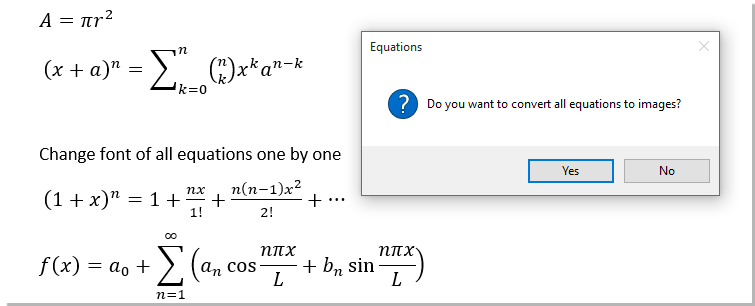
All equations in the document will be converted to images immediately.


Notes:
- This method allows you to undo the conversion if needed.
- You can also convert images back to equations using the Image to Equation utility in Kutools for Word. However, Image to Equation only works for images that were converted from equations using the Equation to Image feature of Kutools for Word.
- This function is not available in Word 2013.
Convert equations into embedded images with the Save As Word 97-2003 Document option
Unlike the Save As Web Page option, the Save As Word 97-2003 Document option converts equations directly into images within the document rather than saving them in a separate folder.
- In your Word document, click File > Save As > Browse.

- Specify a location to save the file, select Word 97-2003 Document from the Save as type drop-down list, enter a file name, and click the Save button.

- When the Microsoft Word Compatibility Checker window appears, click the Continue button.


Note:
- If you save the file with the same name and location, the original document will be replaced. To preserve the original file, save it with a different name or in a different location.
- Saving in the Word 97-2003 format will convert equations into images within the document, but some features such as comments, endnotes, and footnotes may be lost.
Save an equation as an image using the Snipping Tool
The Snipping Tool is commonly used to capture a selected area of the screen as an image. Follow these steps to convert an equation into an image:
- Open the document and fully display the equation that you want to convert into an image on the screen.
- Click Start > All Programs (All Apps) > Windows Accessories > Snipping Tool.

- When the Snipping Tool window opens, click the New button and capture the equation you want to save as an image.
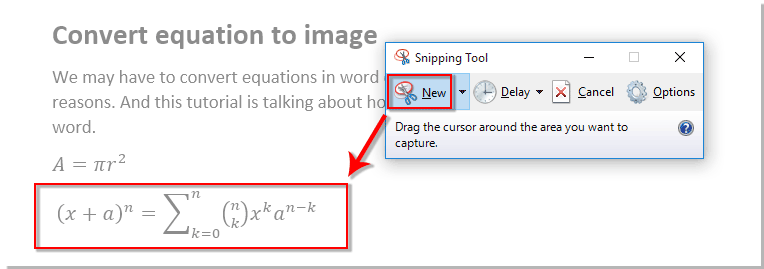
- Once the selected equation is displayed in the Snipping Tool window, click File > Save As to save the captured equation as an image.




Note: If your document contains many equations, manually converting them into images can be a time-consuming process.
Export all equations as images using the Save As Web Page option
Compared to using the Snipping Tool, the Save As option offers a faster way to convert equations into images and store them in a folder.
- In your Word document, click File > Save As > Browse.
- Specify a location to save the file, select Web Page from the Save As type drop-down list, enter a file name into the File name box, and then click the Save button.


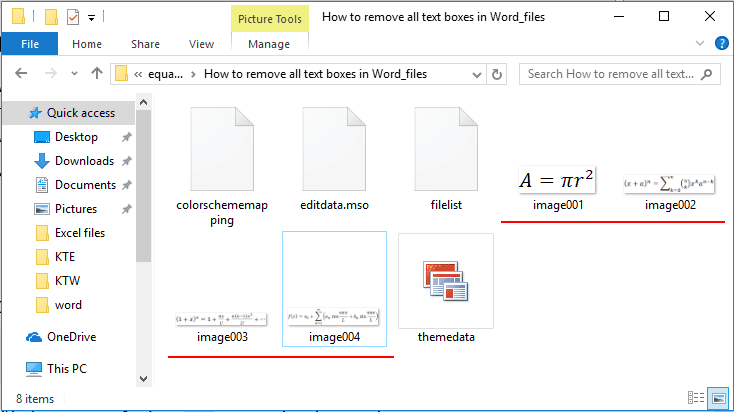
Navigate to the location where you saved the file, open the corresponding folder, and you will find that all equations in the document have been converted into images and saved as image files.
Demo: Quickly convert equations to images with Kutools for Word
Kutools for Word extends Microsoft Word with a wide range of practical tools, helping you save time and reduce repetitive work in daily document editing.
Best Office Productivity Tools
Kutools for Word - Elevate Your Word Experience with Over 100 Remarkable Features!
🤖 Kutools AI Features: AI Assistant / Real-Time Assistant / Super Polish (Preserve Format) / Super Translate (Preserve Format) / AI Redaction / AI Proofread...
📘 Document Mastery: Split Pages / Merge Documents / Export Selection in Various Formats (PDF/TXT/DOC/HTML...) / Batch Convert to PDF...
✏ Contents Editing: Batch Find and Replace across Multiple Files / Resize All Pictures / Transpose Table Rows and Columns / Convert Table to Text...
🧹 Effortless Clean: Sweap away Extra Spaces / Section Breaks / Text Boxes / Hyperlinks / For more removing tools, head to the Remove group...
➕ Creative Inserts: Insert Thousand Separators / Check Boxes / Radio Buttons / QR Code / Barcode / Multiple Pictures / Discover more in the Insert group...
🔍 Precision Selections: Pinpoint Specific Pages / Tables / Shapes / Heading Paragraphs / Enhance navigation with more Select features...
⭐ Star Enhancements: Navigate to Any Location / Auto-Insert Repetitive Text / Toggle Between Document Windows / 11 Conversion Tools...
🌍 Supports 40+ Languages: Use Kutools in your preferred language – supports English, Spanish, German, French, Chinese, and 40+ others!

Office Tab - Brings Tabbed interface to Office, Make Your Work Much Easier
- Enable tabbed editing and reading in Word, Excel, PowerPoint, Publisher, Access, Visio and Project.
- Open and create multiple documents in new tabs of the same window, rather than in new windows.
- Increases your productivity by 50%, and reduces hundreds of mouse clicks for you every day!
✨ Kutools for Office – One Installation, Five Powerful Tools!
Includes Office Tab Pro · Kutools for Excel · Kutools for Outlook · Kutools for Word · Kutools for PowerPoint
📦 Get all 5 tools in one suite | 🔗 Seamless integration with Microsoft Office | ⚡ Save time and boost productivity instantly
Best Office Productivity Tools
Kutools for Word - 100+ Tools for Word
- 🤖 Kutools AI Features: AI Assistant / Real-Time Assistant / Super Polish / Super Translate / AI Redaction / AI Proofread
- 📘 Document Mastery: Split Pages / Merge Documents / Batch Convert to PDF
- ✏ Contents Editing: Batch Find and Replace / Resize All Pictures
- 🧹 Effortless Clean: Remove Extra Spaces / Remove Section Breaks
- ➕ Creative Inserts: Insert Thousand Separators / Insert Check Boxes / Create QR Codes
- 🌍 Supports 40+ Languages: Kutools speaks your language – 40+ languages supported!